

"We replaced three tools with Yaplet and our response time dropped from 4 hours to 2 minutes. The AI gets it right almost every single time."
MK
Maya K.
Head of Support, SaaS company
Watch real visitor sessions, scored by AI so you open the few that matter, right beside the conversation.

 G2 · Capterra| Privacy-first capture
Sarah R. · Returning visitor
Chrome · Berlin, DE · /checkout
Importance
92 / 100
Duration
2:14
Pages
4
Replaying session
AI triage
Yaplet scores every session the moment it's captured. The ones with rage clicks, errors and dead ends rise to the top, so your team opens the sessions that need a human.
Session replays
Sorted by importance
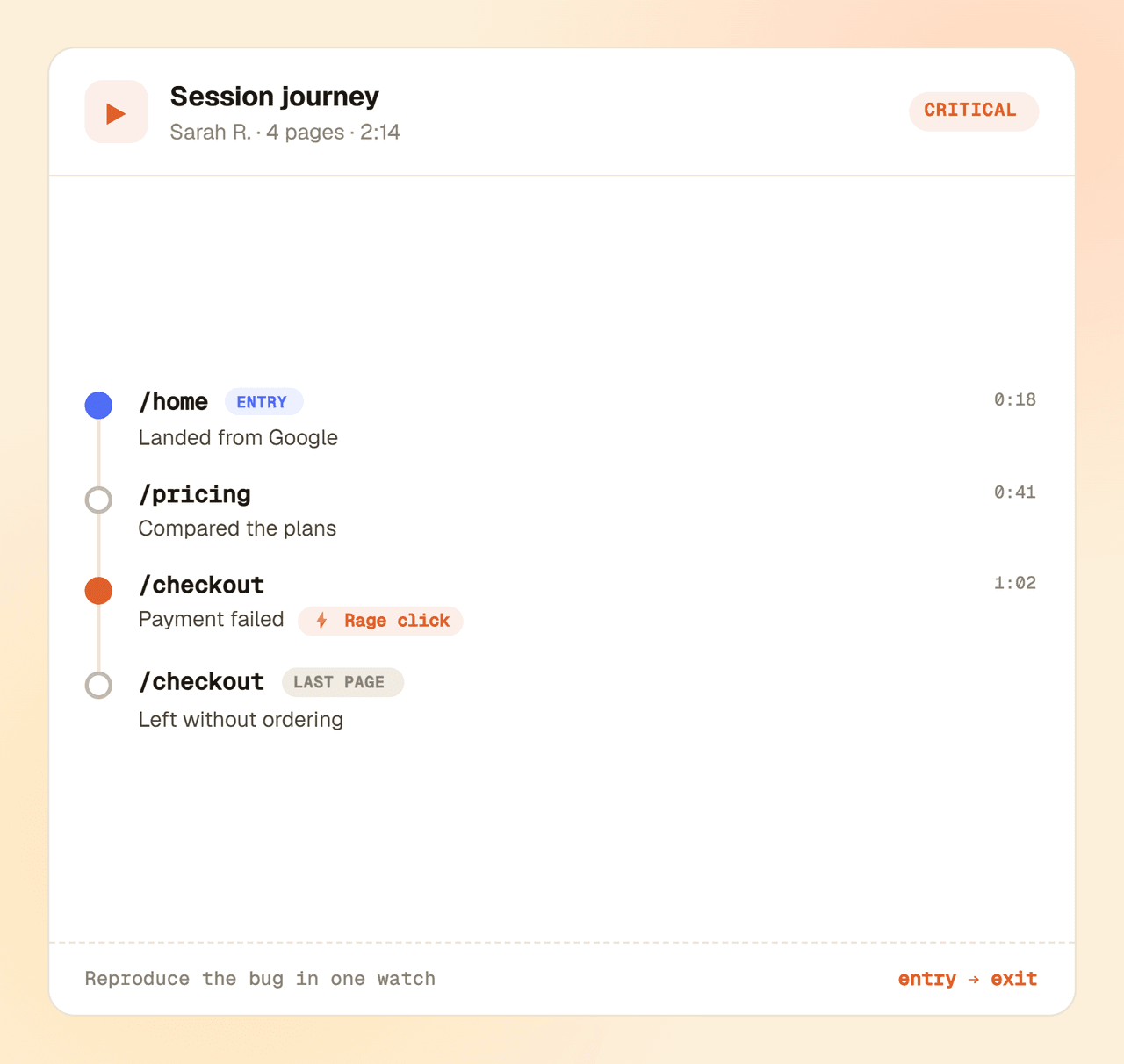
Sarah R. · /checkout
4 pages · 2:14 · rage clicks + payment error
Marco T. · /pricing
3 pages · 1:48 · bounced on plan compare
Aiko L. · /docs
2 pages · 0:39 · read and left
Low, Medium, High and Critical, so the urgent sessions are obvious before you open a single one.
Rage clicks, console errors, failed network requests, page depth and session length all push a session up the list.
Sort by importance and watch the critical sessions first, instead of opening recordings at random.
Features
Faithful replays, AI that points you to the right ones, and the playback controls that make reviewing fast.
Yaplet scores every session Low to Critical from real signals, so you review the few that matter, not the hundreds that don't.
Yaplet stitches multi-page sessions into one continuous replay and marks the idle gaps instead of cutting them out.
Idle-skip collapses pauses over 30 seconds, and you can play back at 0.5×, 1×, 1.5× or 2×.
The scrubber marks every click, scroll and form input. Click a marker to jump straight to that moment.
Narrow by visitor email, URL, country, device, widget or pinned-only, then sort by importance or recency.
Storage rolls over automatically. Pin the recordings worth keeping and cleanup never touches them.
In context
When a customer writes in, their session is right there in the thread. Watch what they did before they typed, and understand the bug report without the back-and-forth.
Setup
From signed-up to watching real sessions in minutes, with one snippet and nothing to configure.
Add one snippet to your site. Recording starts the moment the widget loads, subject to the rules you set.
Yaplet captures real sessions in the background and scores each one by importance as it goes.
Find a replay from the inbox or the replays page, and watch exactly what happened, marker by marker.
Open a free Yaplet account, add the widget, and upgrade to Growth to turn replays on and let AI point you to the sessions worth watching.
FAQ
What gets recorded, how privacy works, and how the AI scoring decides what matters.
Still have a question?
Real humans on chat, happy to help.
Yaplet records sessions with rrweb, which captures the page's structure and interactions as lightweight data, not screen video or screenshots. Password fields are masked automatically, canvas and cross-origin frames are never recorded, and large embedded images are stripped. You can mask or block any element by adding a CSS class (gl-mask, gl-block) or with setReplayOptions, and you control what gets captured with page and visitor targeting rules. Recordings are served only over short-lived signed links. There's no automatic PII masking beyond passwords, so tag sensitive fields yourself, and keep your privacy policy and any consent requirements up to date for your jurisdiction.
No. Recording captures lightweight changes to the page in the background rather than video, runs after your page has loaded, and strips heavy embedded images. Visitors won't notice it, and it won't block your page from loading.
Each widget has a rolling storage budget of 50 slots (about 2MB each). When it fills up, the oldest unpinned recordings are removed automatically. Pin the recordings you want to keep and they're protected from cleanup, up to half of your slots. Single recordings are capped at 50MB and six hours.
Every session gets a 0 to 100 score built from real signals: session length, pages visited, rage clicks, JavaScript console errors, failed network requests, and whether the visitor is identified. That score maps to four levels, Low, Medium, High and Critical, and a multi-page session takes the highest score of its pages. It's a transparent, signal-based score you can reason about, not a black box.
Yes. Filter by visitor email, URL or entry page, country, device and widget, then sort by importance or recency. If you've identified a visitor, their email is searchable too.
Yes. Sessions from mobile browsers are recorded and play back the same way, and you can filter to mobile or desktop. This covers mobile-web sessions; screens inside a native iOS or Android app aren't recorded.
Session replays are available on the Growth plan. Start on the free plan to set up your widget, then upgrade to Growth to turn replays on.
Reviews
Loved by people and teams that care about making every customer interaction more insightful and efficient.
G2Capterra