
"We replaced three tools with Yaplet and our response time dropped from 4 hours to 2 minutes. The AI gets it right almost every single time."
MK
Maya K.
Head of Support, SaaS company
Your chat contacts are already your newsletter list. Drag-and-drop builder, segments based on real behaviour, and replies that land back in the same inbox as your live chat.

 on G2 & Capterra| High deliverability
Inside the dashboard
Build a campaign in five steps, design it with the drag-and-drop editor, send it to a segment of subscribers who already chat with you. No CSV exports. No second tool.
Email campaigns
Drafts · Scheduled · Sent
Spring lookbook
2h agoWeekly digest #38
in 2dCart recovery
todayWelcome series
yesterdaySubscriber segments
Build segments from any custom field. They update as your subscribers change.
Yaplet Newsletter
Welcome to the inside track
Hi {{ first_name }},
The products our team picked for you this week, built in the drag-and-drop editor.
Bestseller
New in
Blocks
Built for real audiences
No add-ons, no per-feature upgrade walls. The newsletter you send next month uses the same tools as the one you send today.
Build the email by dragging blocks: headings, text, images, buttons, columns. No HTML needed, and you can drop in raw HTML when you want to.
Define your own fields: first name, country, plan, anything you track. Use them as merge tags inside the email.
Split your list into groups for organisation, and segments built from filters that update automatically as subscribers change.
Run multiple subscribe-confirmation emails side by side to pick the one with the strongest opt-in rate.
Pick the day and time. Yaplet handles the queue. Drafts, scheduled, sent and cancelled live in their own tabs.
Add your domain, drop in the SPF and DKIM records, and Yaplet handles deliverability, including IP warmup for fresh domains.
One-click unsubscribe, an unsubscribe footer in every email, and a clean record of who opted out and when.
Double opt-in via verification emails, EU-hosted data and a verified vs. unverified contact state on every subscriber.
Subscribers and chat contacts are the same people in the same database. Segment by what they bought, asked or visited. Never export to Mailchimp again.
The campaign builder
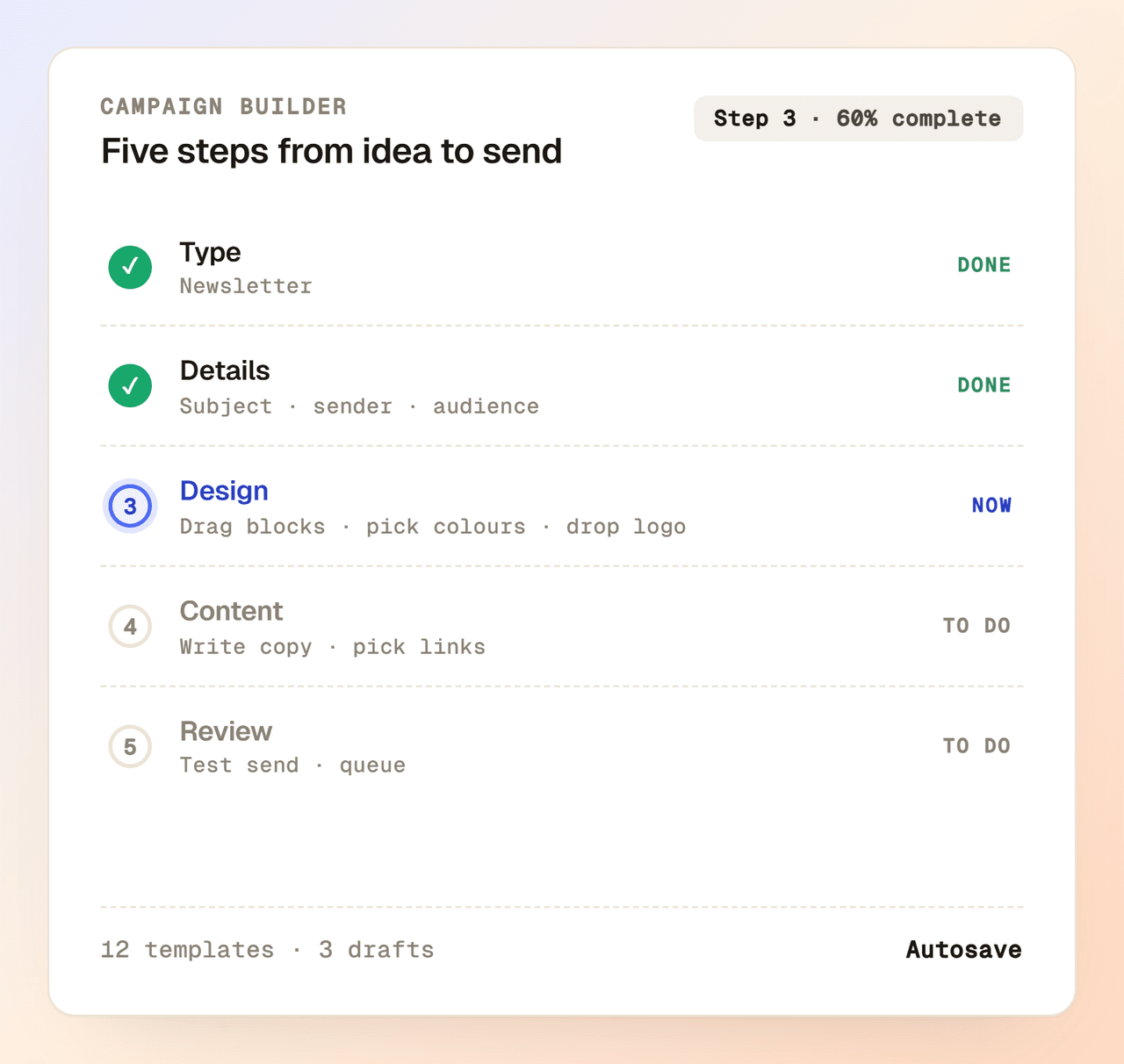
Start from a blank canvas, a saved template or a recent email. Drag blocks into place, set the colours, drop in your logo, and you're ready to send. Preview every change in real time on desktop and mobile.
Real deliverability
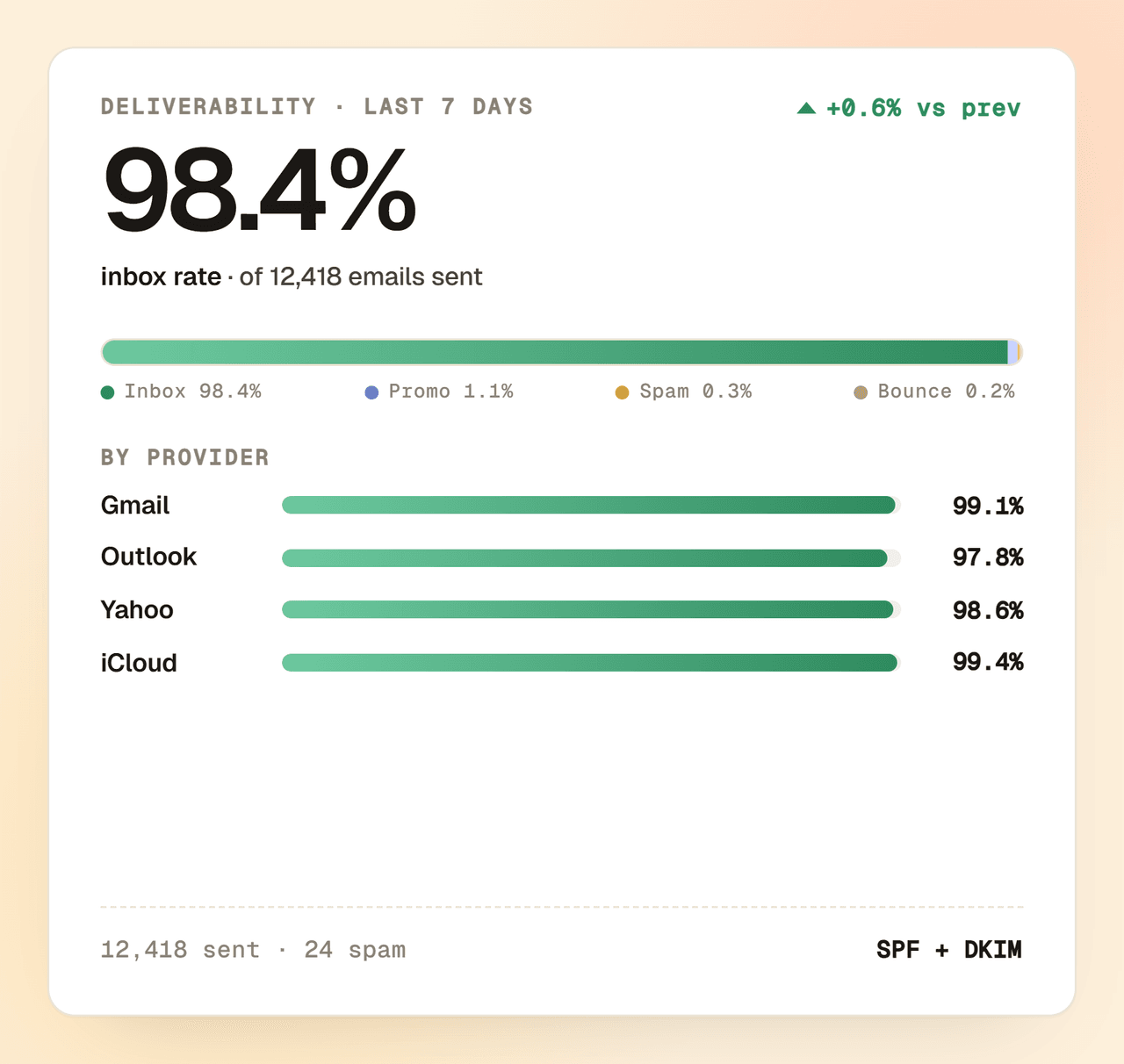
Send from your own domain, not a generic one. Add the SPF and DKIM records once, verify them in the dashboard, and you're sending mail that belongs to your brand.
First send in an afternoon
Skip the engineers and the migration plan. Import the list, design the email, queue the send, all in the same dashboard, the same afternoon.
Upload a CSV, paste a list or collect new subscribers via a verification form. Define your own custom fields as you go.
Drag blocks into place in the editor, drop in merge tags from your custom fields, and preview the email before you send.
Pick a segment, choose a verified sender, queue it for now or for later. Yaplet sends it through your authenticated domain.
Free plan to start, drag-and-drop editor from day one, replies that land in the same inbox as your live chat. No card, no contract, no CSV export.
Common questions
Short answers about sending email with Yaplet. Still stuck? Open a chat and we'll reply ourselves.
Talk to a real person
We use Yaplet too. Try it on us.
Yes. You can try the drag-and-drop editor, manage subscribers and send a campaign on the free plan. Paid plans raise the sending limits and unlock features like workflows.
Yes. You add your sending domain in the dashboard, drop in the SPF and DKIM records we give you, and we verify it in the background. After that, you pick a verified sender for each campaign.
Yes. You can upload a CSV, paste a list, or sync subscribers in via the API. Define your own custom fields and map them during the import.
Groups are static: you put a subscriber into a group and they stay there. Segments are filter-based and update when a subscriber's data changes, so a 'recent buyer' segment always reflects today's list.
When someone subscribes via your verification form, they get a confirmation email. Variants let you run multiple versions of that email side by side, see which one gets the highest opt-in, and use it as the default.
Yes. Every email includes an unsubscribe footer and a one-click unsubscribe link. Yaplet records who opted out and excludes them from future campaigns.
Yaplet is EU-hosted, supports double opt-in via verification emails, and tracks each contact as verified or unverified. You stay in control of your subscriber data and can export or delete it anytime.
Reviews
Loved by people and teams that care about making every customer interaction more insightful and efficient.
G2Capterra